Getting started
Everything you do in StampChip is one of five things: start a session, check in, cash out, back up, and (once a year) export. This page walks through each with the real screens.
1 Install
StampChip is in private testing. The invite email brings a code (SC-XXXX-XXXX) that works on up to two of your own devices; the app asks for it the first time it opens. No account is created at any point, and when the public listing opens the code goes away.
- Android. Open the Google Play test link from the invite email with the Google account you signed up with and install StampChip like any other app; it updates itself. Until the Play link is in your email, the app also runs straight from app.stampchip.com in Chrome.
- iPhone. Open app.stampchip.com in Safari, tap Share, then Add to Home Screen, and open StampChip from the home screen. Do that before you log anything, and enter your code in the home-screen app rather than the Safari tab: the two keep separate records. Everything else works the same way; make a backup now and then, because iOS can clear a web app's storage that has not been opened for a long while.
Allow location access when the app asks. It is used only when you tap Use my location or Check in, and the fix is stored with the session on your phone.
2 Start a session
Tap Start a session when you sit down. The date and time fill themselves.
- Where. Tap Use my location to pick the casino from the places near you (the built-in list covers 780 US casinos; a Google lookup adds the rest), or type the name and address. For online play, tick Online or in an app and enter the site.
- What you played. Pick the game and enter the machine, table or tournament number. Each game shows a short note on what Publication 529 asks for.
- Who was with you. Tap Just me or add names; names you have used before are one tap away.
- Money in. Enter the first buy-in and where it came from (cash, ATM, casino credit, a ticket from earlier play). Add more buy-ins from the session ticket as the night goes on.
Prefer to log after the fact? Log a finished session takes the same details plus the end time and money out in one go.

3 Check in
While a session is open, its ticket sits at the top of the screen. Tap Check in now and then: the app records the time, your location and its accuracy, and how far you are from the venue. Each check-in is hashed together with the previous one, so the stamps form a chain that shows the entry was not rewritten afterwards.
A check-in is evidence you generate yourself. It supports your diary; keep the casino's own records (win/loss statements for carded play, W-2Gs, tickets) alongside it.

4 Cash out and W-2Gs
Tap Cash out when you leave and enter what you left with — cash, checks and tickets together. The net result is money out minus money in.
If the casino handed you a W-2G, tick I got a W-2G this session and copy the boxes: winnings (box 1), federal tax withheld (box 4) and state tax withheld (box 15). Tax withheld counts as money out even though you never held it, and the year's W-2G total is checked against your winning sessions so a mismatch is flagged before tax season.
Made a mistake? Edit the session; the change is logged with the time. Entries that should not count can be voided, and voided entries stay on record.

5 Year and day
The cards at the top show the tax year: won, lost, net, W-2G total and estimated federal and state tax at the rates you set under Change rates. Switch to Day to see one day's sessions, which is how the diary is kept. Below the list, By place and By day add up the year, and the place table marks which casinos have your player's card so you know where to request a win/loss statement.
Sessions missing a detail the IRS asks for are counted at the top; tap through to fill them in.

6 Back up
Your diary lives only on your phone. Open Settings → Back up now, choose a passphrase, and the app writes one encrypted file (StampChip-backup-YYYY-MM-DD.scbak) and hands it to the share sheet: send it to Drive, email it to yourself, or save it to your computer.
The first time, the app shows a recovery code — twenty characters that also open every backup made on that phone. Save it in a password manager or write it down with your tax papers. The code is kept on the phone and can be shown again from Settings; the passphrase is never stored anywhere. BFVZ cannot reset either one.
The app reminds you when sessions are not in a backup yet. A backup before every casino trip, or once a month, is plenty.

7 Restore on a new phone
Install StampChip, open Settings → Restore from a backup, pick the file, and enter the passphrase or the recovery code. Merge adds what the phone does not have and keeps the newer copy of anything on both sides; Replace wipes the phone's diary first. Both leave the file untouched, so you can restore the same backup on two devices.
8 Tax time
The Preparer Pack turns a tax year into a printable diary in the order Publication 529 lists and a workbook your preparer can work from, with every session, the W-2G reconciliation and both deduction bases. It is a one-time purchase per tax year inside the app and will be available before 2026 returns are due. Give it to your preparer together with your W-2Gs and casino statements; what to report and how is their call and yours.
This is what it looks like, built from a sample diary with made-up sessions. Tap a page to see it full size.
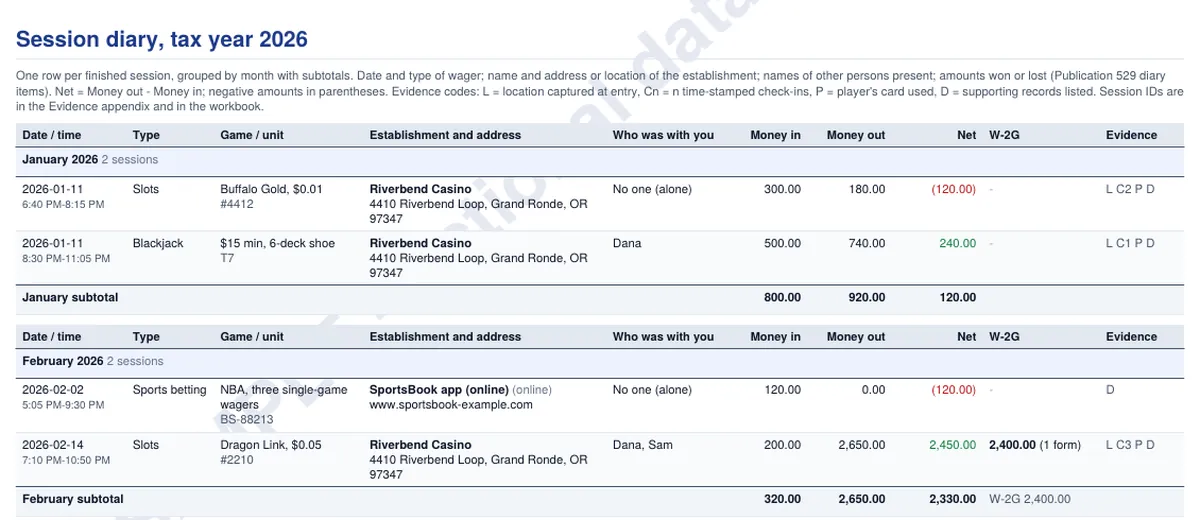
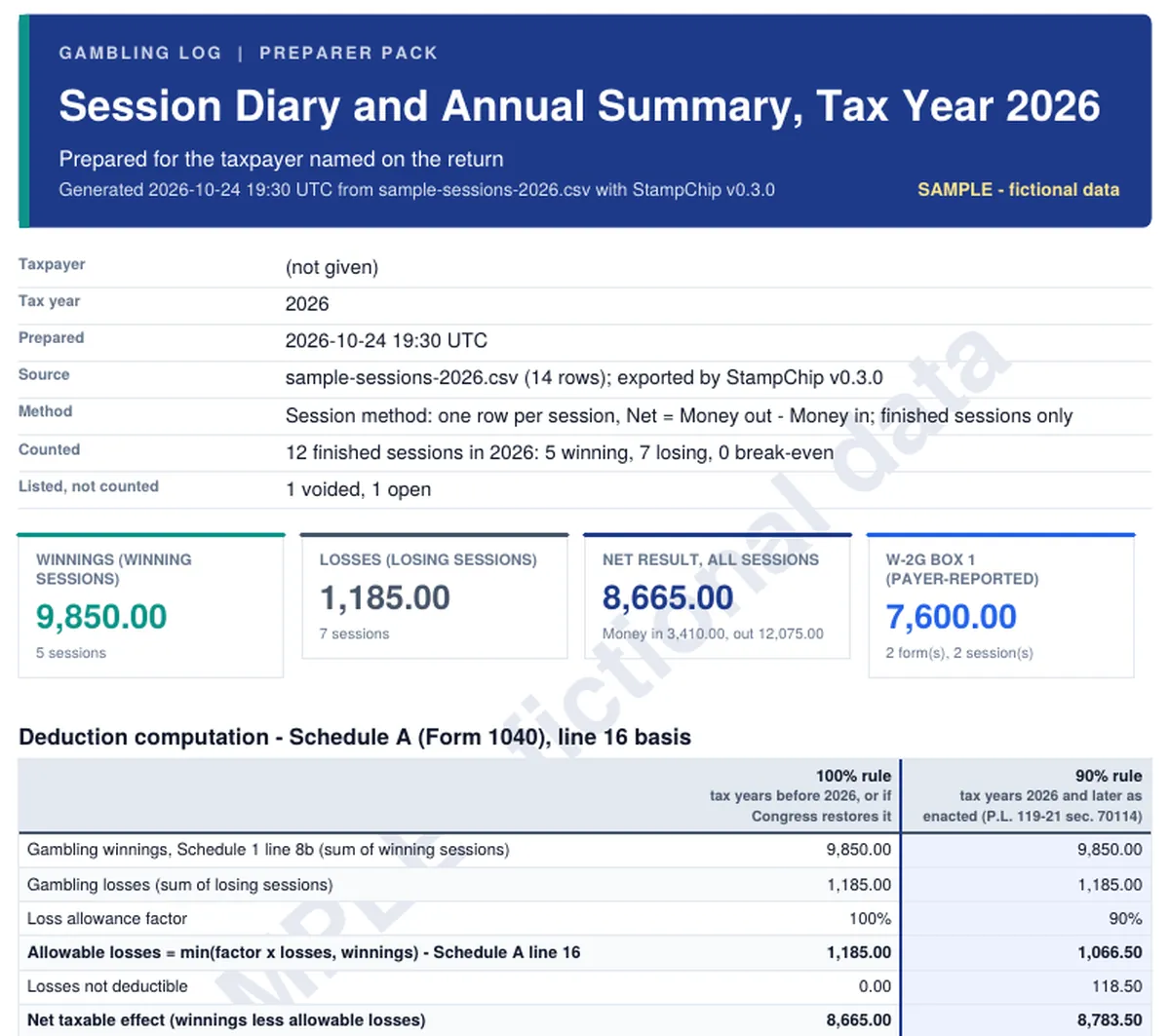
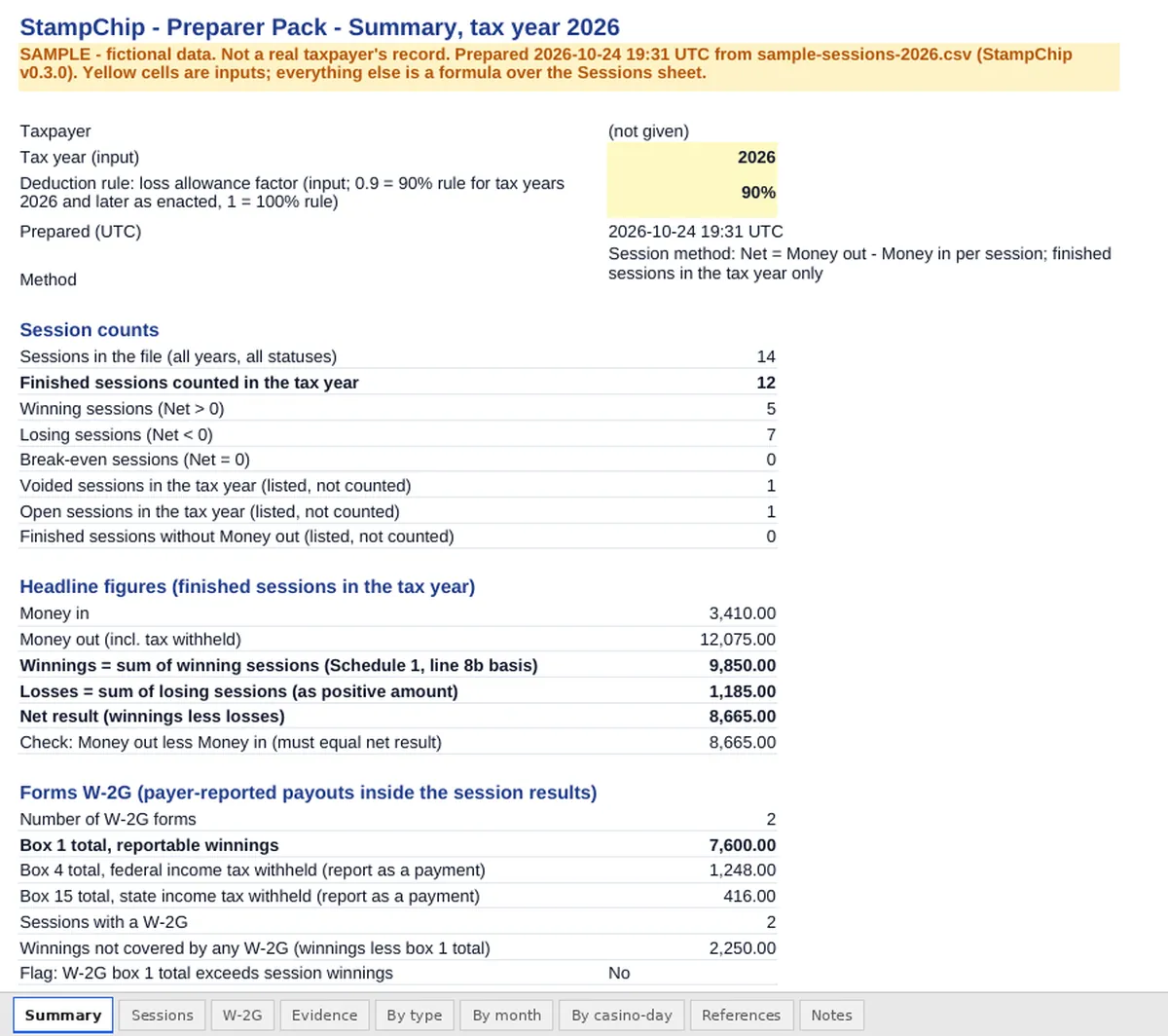
The pack you buy is built from your own sessions on your phone. The sample is fictional and is not anyone's record.
9 If something is off
- No casinos found near me. The built-in list covers the larger US casinos; smaller rooms, bars and card rooms may be missing. Type the name and address; the location you captured is still saved with the session.
- Location is greyed out. Allow location for StampChip in the phone's app settings, and turn on location services. Check-ins need a fix from the phone.
- "Storage is not yet marked persistent." Android may clear web storage when space runs low. Installed apps are protected after a little use; a current backup is the real safety net.
- Lost the passphrase. Use the recovery code. Lost both? The backup cannot be opened by anyone, BFVZ included.
Anything else: hello@stampchip.com.
A note on what this is. StampChip is a record-keeping tool. It is not tax, legal or financial advice, it does not replace a licensed tax professional or attorney, and it does not guarantee any outcome with the IRS or any state. You are responsible for what you enter, for keeping backups, and for how you use the exports and reports. BFVZ LLC is not affiliated with the IRS or any casino.